October 19, 2025 | Career
The structure plane: organize the experience
How structure helps users move through your product without getting lost
The structure plane is one of five layers Jesse James Garrett laid out in his book The Elements of User Experience. It’s still one of the clearest ways to think about what you’re building — and why.
Structure is what helps your product make sense.
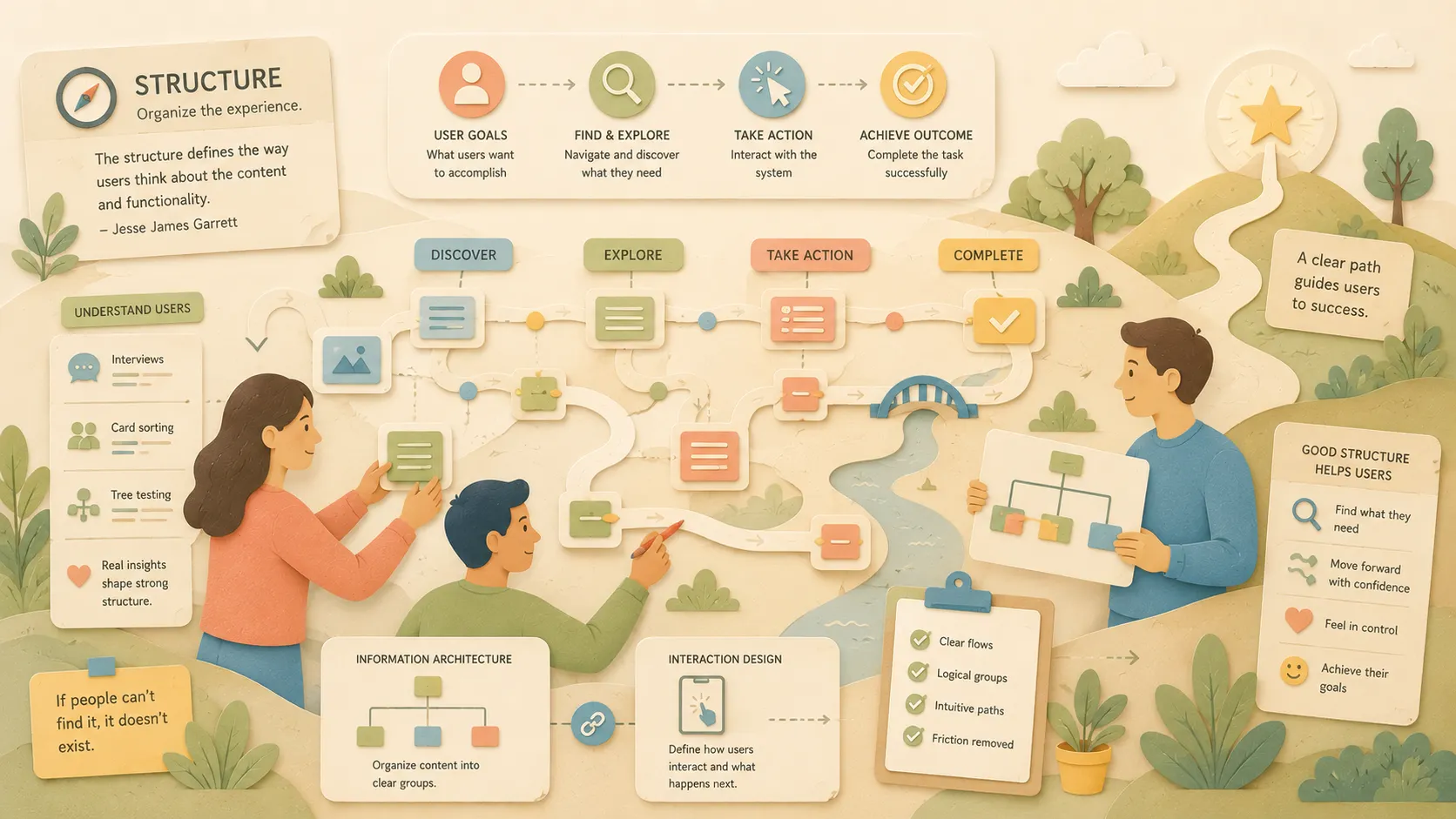
The structure defines the way users think about the content and functionality.
— Jesse James Garrett, The Elements of User Experience
You’ve defined your goals. You know what you’re building. Now it’s time to figure out how it all fits together.
This is the layer where teams often rush ahead. They start sketching screens, building flows, and adding links without stopping to ask:
Does this actually help users get where they need to go?
It’s not about layouts yet. It’s not about copy or color. Structure is how people move through the product and how the product behaves in response.
Good design is actually a lot harder to notice than poor design, in part because good designs fit our needs so well that the design is invisible.
— Donald Norman
When you get it right, users don’t notice it. They just move. When you get it wrong, they stall, click in circles, or bail out.
In this article, we’ll break down what the structure plane is, how to shape it, and what skills, tools, and team habits will keep it grounded in real user needs.
What the structure plane is.
The structure plane defines how everything fits together. It connects what the product does with how people move through it.
Jesse James Garrett breaks structure into two parts:
- Interaction design — How users interact with the system and how it responds
- Information architecture — How content is organized, grouped, and labeled
This is the layer where function and meaning come together. You’re not deciding what to build anymore, you’re shaping how it works.
When the structure is weak, users feel it. They can’t find what they need. They backtrack. They abandon. Even good features fall apart if they’re buried in the wrong place or show up at the wrong time.
Strong structure helps users form a clear mental model of your product. It creates flow. It makes the experience feel intuitive, even if the system behind it is complex.
If strategy is your purpose and scope is your plan, structure is the path that guides users through it.
How to work in the structure layer.
The structure layer is where clarity starts to emerge. You’re shaping how the product behaves and how users move through it. This is where you build the spine, not the skin of the experience.
Here’s how to work in this layer:
1. Map the flow
Start with what the user needs to accomplish. Outline the steps it takes to get there. These flows should reflect how people think, not how your database is structured.
Whether you’re designing a checkout, onboarding, or task manager, mapping the user’s path helps everyone understand what’s happening when and why.
If you want a great site, you’ve got to test. After you’ve worked on a site for even a few weeks, you can’t see it freshly anymore. You know too much.
— Steve Krug
2. Group and organize content
If your product has content, structure matters. Identify what content is needed, then group it logically. Use tools like content inventories, card sorts, or user interviews to reflect your users’ mental model and not your org chart.
If people can’t find it, it doesn’t exist.
A user interface is like a joke. If you have to explain it, it’s not that good.
— Martin LeBlanc
3. Prioritize clarity over cleverness
Avoid unnecessary interactions or complex logic. Every layer of structure should remove friction, not add it.
Here’s what that looks like:
Renaming nav items for style
- You change “Transactions” to “Activity” and “Budget” to “Planner” because it sounds modern. But users stop clicking. Support tickets go up.
- ✘ Stylish ≠ useful.
Swapping a checklist for an animated tour
- Your team builds a slick onboarding carousel. But users skip it, miss the setup steps, and get stuck.
- ✔ A plain checklist would’ve worked better.
Clarity wins.
4. Start with behavior — not screens
Don’t jump straight into high-fidelity mockups. Start by sketching how users move through the experience, what they’re trying to do, what happens next, and what decisions they need to make.
Use low-fidelity prototypes or even paper sketches to explore flow and structure before layering on detail.
And don’t just map the path. Study how users behave in this and similar environments. The better you understand their mental model, the more intuitive your structure will feel.
Artifacts, hard skills, and soft skills
Structure is where ideas start to take form. It’s also where teams start to diverge if the work isn’t visible.
Artifacts
Make the structure visible so your team can align and test early.
- Task flows
- Site maps
- Journey maps
- IA diagrams
- Tree tests
Hard skills
Build a structure that matches how people think.
- Information architecture
- Interaction design
- Flow modeling
- Tool proficiency: FigJam, Whimsical, Lucidchart
Information Architecture Basics — A great primer from Nielsen Norman Group.
Soft skills
Keep the structure grounded in user needs and collaboration.
- Empathy
- Logic
- Facilitation
- Listening for confusion
Real world example
We were in the middle of a major global navigation restructure. Strategy was now aligned. The scope was tight. But we still had one big question to solve:
How should everything be organized so people can actually find what they need?
That’s where structure came in.
We ran multiple rounds of testing, open card sorting, closed card sorting, tree tests, and more tree tests. The patterns were clear: our existing navigation had drifted. It had been shaped by internal needs and product silos over time. It wasn’t matching how users thought about the site or how they searched for information.
We shared the results with stakeholders. It was hard to hear, but necessary.
We showed how people grouped content, where they expected certain pages to live, and how much friction the current structure created. Once stakeholders saw the data, the conversation shifted. It was no longer about defending the old nav; it was about doing what actually worked for users.
That’s the power of the structure plane.
It gave us the clarity to rebuild based on user behavior, not internal assumptions. And it gave the team a path forward that was grounded in evidence, not opinions.
How it connects to the other planes
Structure is where everything starts to come together, and where everything above can fall apart if you’re not careful.
The decisions made on the structure plane are informed by the scope and directly influence the skeleton and surface planes.
— Jesse James Garrett
If your strategy isn’t clear, you’ll build flows that don’t serve a goal. If your scope is scattered, your structure will stretch in too many directions. And if your structure is weak, it will ripple upward: confusing wireframes, poor navigation, broken interactions, and user frustration.
Structure holds the shape of the experience.
It connects the why (strategy), the what (scope), and the how (skeleton and surface). It defines relationships between features, pages, and content. It gives your product a spine that supports clarity, trust, and usability.
This is where the Double Diamond framework from the Design Council holds up. The second diamond — define and deliver — depends on a strong structure. It’s how teams stop spinning and start building something useful.
When you get this layer right, everything else above it gets easier. The team knows what belongs where. Users know how to move. And the experience feels more intuitive — without needing to explain it.
In Conclusion
Structure doesn’t get as much attention as visuals or strategy, but it’s what holds everything together.
It’s the layer that translates intent into interaction. It turns planning into flow. When teams skip it, users feel it. When teams get it right, everything above it works better.
Good structure makes your product easier to use. It makes decisions easier to make. And it keeps your experience aligned with what users actually need.
This is the quiet layer that makes the rest of your work shine.
Take Action
Start building a better structure with your team this week. Here’s how:
- Pull up a current user flow. Does it reflect how users actually think and move, or how your system is built?
- Run a tree test or card sort on a content-heavy section. What does it reveal about user expectations?
- Sketch a flow before you sketch a screen. Start with the behavior, not the layout.
- Walk through a recent release. Where did structure support clarity, and where did it create friction?
- Make structure visible. Map it out, test it, and share it early.
Structure doesn’t have to be complex. It just has to work for your users.
Further Reading
- The Elements of User Experience by Jesse James Garrett — The foundation of the five planes. Chapter 5 covers structure in detail.
- The Double Diamond — Design Council — A reminder to define before you deliver. Strong structure lives in the second diamond.
- User Experience Honeycomb — Peter Morville — Shows how structure supports findability and usability.
- Laws of UX — Jon Yablonski — Helpful for shaping flow and behavior based on how people think.
- Designing Connected Content — Carrie Hane & Mike Atherton