August 25, 2025 | Career
Introduction to the five planes of UX
How to align your team from strategy to interface without the chaos.
Why do some products just work while others feel clunky, confusing, or disconnected?
It usually comes down to this: the team jumped to visual design without first aligning on goals, features, or structure.
The Five Planes come from Jesse James Garrett, a UX designer in the early web era who helped shape the field. He introduced the model in his 2002 book The Elements of User Experience to bring clarity to the messy process of designing for the web. It’s still one of the clearest ways to think through what you’re building and why.
The user experience design process is all about ensuring that no aspect of the user’s experience with your product happens without your conscious, explicit intent.
— Jesse James Garrett, The Elements of User Experience
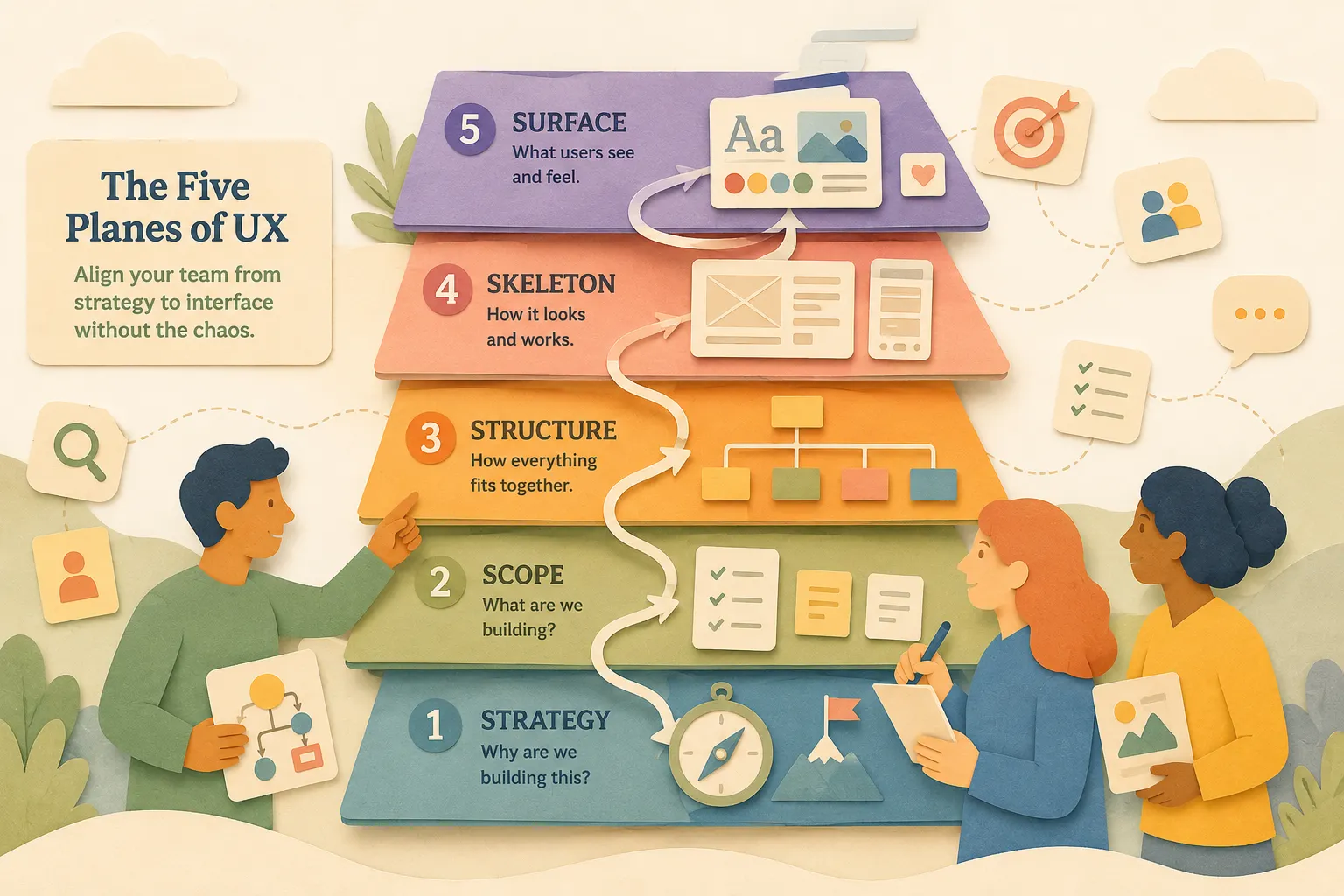
Each plane builds on the last: strategy, scope, structure, skeleton, and surface. If you skip one, it shows. The experience breaks down. The team wastes time fixing things that should have been clear from the start.
This article walks through each layer, shows how they connect, and gives you a simple way to keep your work aligned from the big picture to the final design.
Why the five planes of UX matter.
You don’t design a great product by jumping straight into Figma.
You start by thinking through what matters most. What are we solving? Who is it for? What are we building, and what are we not building?
That’s what the Five Planes help you do. They force clarity.
Each plane gives your team a different lens. Strategy focuses on purpose. Scope locks in the features. Structure maps the flow. Skeleton shapes the layout. Surface brings it all to life.
When you follow the layers, decisions get easier. You can explain your thinking. You can catch gaps early. You can move faster without losing your footing.
I didn’t always think this way. Early on, I treated UX like a checklist: make the wireframes, choose the colors and type, hand it off to the dev team. But as the problems got more complex and the company grew, I kept running into the same patterns of misalignment, rework, rushed decisions, and frustrated users.
The Five Planes gave me language for what was missing. Once I started thinking in layers, the work got clearer. My teams moved faster. And the customer experience actually worked.
Plane-by-plane breakdown
Jesse James Garrett’s original diagram was just the starting point. It gave teams a clear, simple way to think about UX. His book broke it open, giving each layer the space it needed and explaining what couldn’t fit on one sheet.
In this section, I’ll walk through each of the Five Planes in a way that’s simple and easy to apply. Over the years, I’ve learned which hard and soft skills show up in each layer, along with the artifacts teams use to bring them to life.
1. Strategy plane
This is where it all starts. What are the business goals? What do users need? The strategy layer keeps your team focused on purpose, not just pixels. If you skip this, you risk building the wrong thing fast.
Key Question
Why are we building this?
Common Artifacts
- Goals
- Personas
- Success Metrics
Hard Skills
- User interviews and surveys
- Stakeholder conversations
- Journey mapping
- Competitive research
- Defining success metrics
- Writing UX briefs or vision docs
Soft Skills
- Strategic thinking
- Listening with empathy
- Curiosity
- Clear framing
- Confident questioning
- Translating user needs into business impact
2. Scope plane
Once you’re clear on the purpose, define the boundaries. What features are in? What content is needed? This layer turns strategy into a working plan. It answers, “What are we actually building?”
Key Question
What are we building?
Common Artifacts
- Feature lists
- Requirements
- Content map
Hard Skills
- User story mapping
- Writing user stories or job stories
- Feature prioritization frameworks
- Content audits
- Requirements documentation
Soft Skills
- Prioritization
- Tradeoff awareness
- Managing ambiguity
- Communicating boundaries
- Pattern recognition
- Alignment with product and engineering
3. Structure plane
Structure is about how everything fits together. It organizes information and interactions so users can move through the product in a logical way. This is where the flow starts to take shape.
Key Question
How does it all fit together?
Common Artifacts
- Site maps
- User flows
- Architecture
Hard Skills
- Task flow and user flow design
- Interaction design
- Navigation structure
- Taxonomy and labeling
- System thinking
Soft Skills
- Logical thinking
- Collaboration with engineering and product
- Anticipating user behavior
- Explaining flow decisions
- Balancing complexity and clarity
4. Skeleton plane
Skeleton makes the structure tangible. It covers layout, navigation, and information hierarchy. Wireframes and prototypes live here. This is where you see the experience take form without getting distracted by visuals.
Key Question
How will it look and work?
Common Artifacts
- Sketches
- Low-fidelity Prototypes
- Navigation model
Hard Skills
- Sketches
- Layout and spacing
- UI component design
- Accessibility principles
- Prototyping tools (Figma, Framer, Axure)
Soft Skills
- Attention to detail
- Clear communication
- Design critique participation
- Giving and receiving feedback
- Iteration
- Cross-functional collaboration
5. Surface plane
Surface is what users see. Visual design, branding, typography, spacing, and color all show up here. It creates the emotional tone and makes the product feel trustworthy and usable.
Key Question
What will users see and feel?
Common Artifacts
- UI design
- Branding
- Colors
- Typography
Hard Skills
- Visual hierarchy
- Color theory and typography
- Branding systems
- UI polish and design systems
- Motion and UI animation
- Handoff prep and asset exports
Soft Skills
- Craftsmanship
- Visual storytelling
- Consistency
- Defending design decisions
- Empathy for how users feel
- Knowing when to polish and when to move on
Interdependency in action
The Five Planes are connected. A change in one affects the rest. When you work from the top down, each decision builds on the last. When you don’t, small changes become costly fixes.
Example 1: Adding a new feature
Your product team adds a calendar to help users track tasks.
At first, it feels simple. But here’s what happens next:
- Scope shifts with the new feature.
- Structure changes to support scheduling flows.
- Skeleton needs space for the calendar layout.
- Surface has to reflect a new interaction pattern.
- And if it doesn’t support the product’s original goal, the Strategy is now misaligned.
A quick decision snowballs into rework.
Example 2: Updating the visual design
You refresh the look and feel to modernize the interface.
What starts on the surface leads to:
- Layout issues in the Skeleton
- New groupings in the Structure
- Uncovered gaps in content and features
- A misalignment with the original Strategy
This kind of cascade happens fast. Teams end up debating pixels when the real issue is unclear goals.
The important consideration here is to not build the roof of the house before you know the shape of its foundation.
— Jesse James Garrett
That’s why working from the bottom up matters. Strategy comes first. Surface comes last. When the foundation is solid, the rest comes together faster and with fewer surprises.
Modern UX relevance
The Five Planes model came from the early 2000s. Screens were smaller. Websites were simpler. But the thinking still holds up.
Today’s products are more complex. Apps, platforms, and cross-channel systems all require careful design. The need for layered clarity hasn’t changed. It has only grown.
The user experience design process is all about ensuring that no aspect of the user’s experience with your product happens without your conscious, explicit intent.
— Jesse James Garrett
Teams move fast. New features launch every sprint. Designers jump into high-fidelity tools before the problem is fully framed. The risk is that you ship something polished that doesn’t solve the right problem.
The Five Planes help you slow down just enough to build the right thing. They give you language for making decisions. They help teams focus, align, and move forward with fewer surprises.
You’re likely already working in these layers, whether you name them or not:
- When you align on a goal or define a problem, that’s strategy.
- When you scope features or content, that’s scope.
- When you diagram a user flow or rethink navigation, that’s structure.
- When you wireframe a layout or test a prototype, that’s the skeleton.
- When you fine-tune the interface, that’s surface.
This model helps you see where you are, what’s missing, and how to move forward without guessing.
In Conclusion
The Five Planes of UX aren’t extra steps. They’re how good teams think.
Every day, product teams make decisions across these layers, whether they realize it or not. This model helps you name the layer you’re in, see what’s missing, and avoid jumping ahead too fast.
You don’t have to follow the planes in perfect order. But if you skip one, you’ll feel it later. Misalignment. Rework. A product that looks polished but doesn’t solve the right problem.
Thinking in layers helps you design with clarity. It keeps teams aligned, decisions grounded, and the customer experience strong from start to finish.
Take Action
Start applying the Five Planes with your team this week. Here’s how:
- Pull out a current project. Walk through each plane. What’s clear? What’s missing?
- Spot where decisions were made too early. Did you skip strategy and jump to features? Did you redesign without checking the structure?
- Use the key questions. Bring them into your next planning session or design critique.
- Keep it lightweight. You don’t need new templates or long docs. Just ask the right questions at the right time.
The goal isn’t to add more process. It’s to build better alignment. One layer at a time.
Further Reading
- The Elements of User Experience by Jesse James Garrett — The book that introduced the Five Planes model and helped define the practice of UX.
- Don’t Make Me Think by Steve Krug — A practical guide to intuitive UX design and why simplicity matters.
- Continuous Discovery Habits by Teresa Torres — A tactical book on how product teams build alignment through weekly customer touchpoints.
- Inspired by Marty Cagan — A foundational book on modern product teams and how product, design, and engineering work together.
- UX Strategy by Jaime Levy — A deeper look at UX strategy, research, and competitive analysis at the top of the five planes.