September 29, 2024 | Career
Making digital spaces inclusive for six types of disabilities
What designing for my brother taught me about building for everyone.
My brother is an adult with cognitive disorders. Watching him try to use his iPhone to find something on the web is one of the more clarifying experiences of my career. He opens an app, tries to navigate it, and usually ends up needing my help. That shouldn’t be normal. It is normal. And that gap is what drives my work in accessibility.
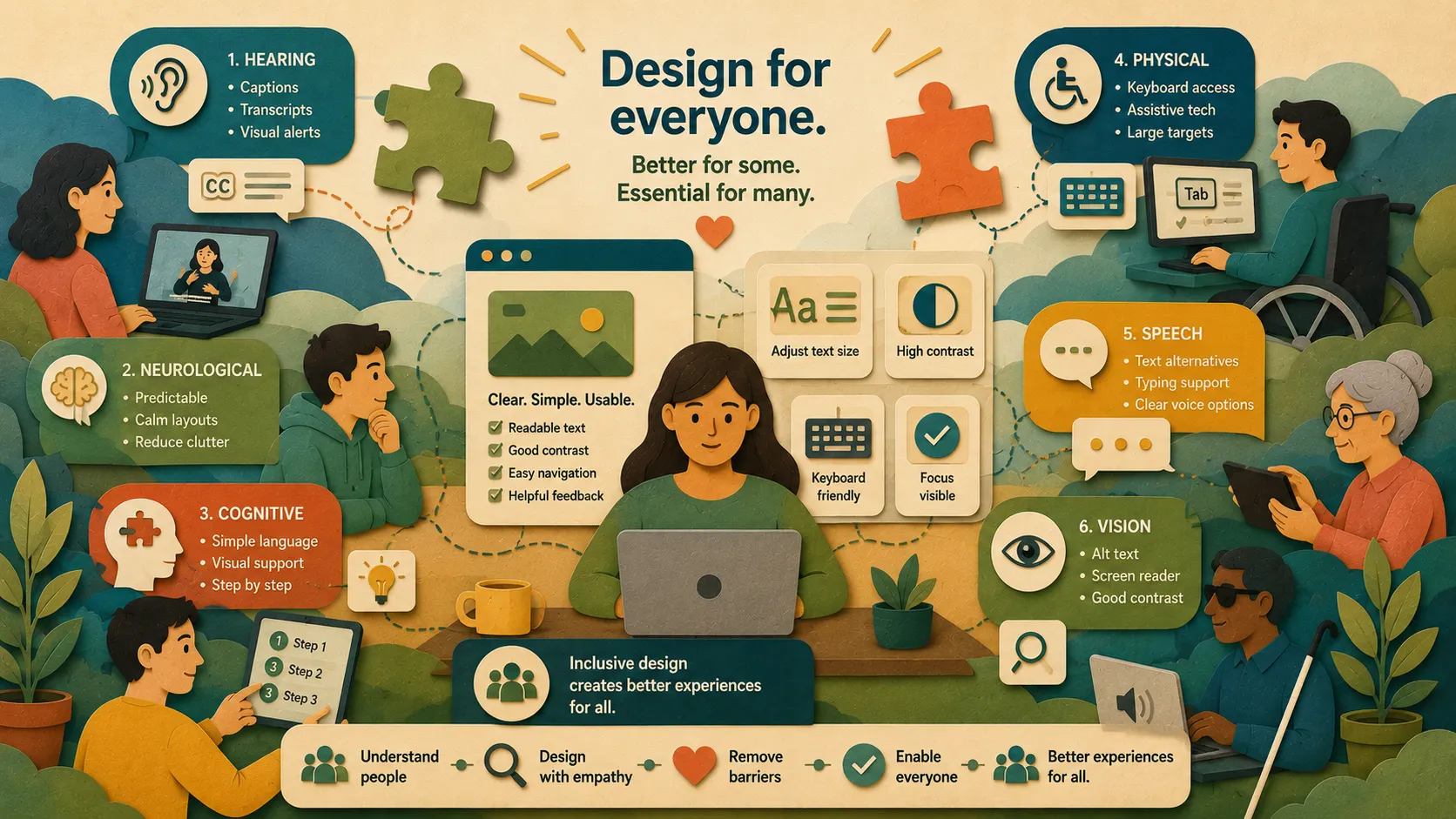
Digital accessibility means building websites and apps that everyone can actually use — including people with disabilities. Not just technically compliant, not just WCAG checkbox-complete, but genuinely usable by people with hearing, neurological, cognitive, physical, speech, and vision challenges.
It’s also worth naming what most people miss: accessible design helps people beyond those with permanent disabilities. People on different devices, older adults, people dealing with a temporary injury, people using a site in poor lighting — they all benefit when we design with inclusion in mind. Accessibility isn’t a niche concern. It’s good design.
The numbers are larger than most people assume
2022 data from the Behavioral Risk Factor Surveillance System found that more than one in four adults in the U.S. — about 70 million Americans — live with some form of disability. That includes challenges with hearing, seeing, moving, thinking, self-care, and independent living.
The same study tracked Long COVID for the first time and found that people with disabilities were more likely to experience persistent symptoms — 10.8% compared to 6.6% for people without disabilities.
If you’re building digital products, a meaningful portion of your users have a disability. Designing without that reality in mind isn’t just an oversight — it’s a decision to exclude people.
The six disability groups.
The Web Accessibility Initiative identifies six main categories. Here’s what each one means practically and what you can do about it.
1. Hearing Disabilities
About 15% of U.S. adults — 37.5 million people — have some degree of hearing difficulty. For digital products, this primarily means that audio-based content creates barriers. Videos without captions, podcasts with no transcripts, alerts that only use sound — these exclude people who can’t hear them.
Common conditions: age-related hearing loss, auditory processing disorder, tinnitus, ear infections, and general hearing loss from ear damage.
What to do: Add captions to every video. Provide written transcripts for audio content like podcasts and webinars. Use sign language for important video content, especially anything educational. Replace audio-only alerts with visual indicators — flashing icons, pop-up messages. Make audio controls fully usable without sound, with text labels that work with screen readers. Don’t autoplay audio or video. Offer multiple contact options beyond phone — chat, email, and text.
2. Neurological Disabilities
Neurological conditions affect more than one in three people worldwide and nearly 100 million Americans, according to the NIH. They encompass a wide range of conditions that affect how people think, move, and process information — and they’re often invisible to the people designing the products those users are trying to navigate.
Common conditions: ALS, Alzheimer’s, autism, epilepsy, multiple sclerosis, Parkinson’s, PTSD, stroke, migraines, and Tourette’s.
What to do: Design navigation that’s simple and predictable. Use consistent layouts with clear headings and break long content into readable sections. Write in plain language — short sentences, familiar words, no idioms. Reduce cognitive load: limit pop-ups, minimize distractions, make it easy to find what matters. Build forms that prevent errors and make correction easy when errors happen. Let users control animations and customize text size and display. Surface help options clearly, and make complicated steps feel approachable.
3. Cognitive Disabilities
The CDC reports that nearly 14% of U.S. adults have a cognitive disability, making it the most common disability category in the country. Cognitive disabilities affect how people understand information, focus, make sense of layouts, read, remember, and solve problems.
Common conditions: ADHD, aphasia, autism, brain injury, dementia, Down syndrome, epilepsy, learning disabilities, PTSD, and stroke.
What to do: Use simple, clear language. Keep navigation consistent across pages so users build familiarity with the layout. Pair text with icons and images — visual reinforcement helps where words alone fall short. Break content into smaller sections with clear headings. Keep pages clean and reduce distractions. Offer content in multiple formats: text, audio, and video. Write step-by-step instructions for tasks like form completion. Build in features like autocomplete, error prevention, and easy error correction. Test with real users who have cognitive disabilities — their feedback will surface things you didn’t anticipate.
4. Physical Disabilities
According to the CDC, 39 million Americans — about 16% of the population — live with a physical disability. These conditions affect movement and the ability to perform everyday tasks, which often means that standard inputs like a mouse or keyboard become significant barriers.
Common conditions: amputation, arthritis, cerebral palsy, muscular dystrophy, paralysis, spinal cord injury, multiple sclerosis, fibromyalgia, and stroke.
What to do: Make the entire site navigable by keyboard alone. Use ARIA labels so assistive technologies can accurately interpret your interface. Support alternative input methods — voice control, eye-tracking, switch devices. Give users enough time to complete tasks without pressure. Make error messages clear and easy to act on. Size buttons and clickable targets generously — precision clicking is hard for many users. Design responsively across devices. Never autoplay audio or video. Keep layouts clean. And test with people who actually use assistive technology.
5. Speech Disabilities
Between 5% and 10% of Americans have some form of communication difficulty. About 3 million adults stutter and approximately 1 million live with aphasia. Speech disabilities create particular friction in digital contexts where voice input is assumed or required.
Common conditions: aphasia, apraxia, articulation disorder, dysarthria, stuttering, phonological disorders, and voice disorders.
What to do: Provide text alternatives for any audio or video content. Add voice control features for users who find typing difficult, but don’t make voice the only option. Design forms that work without verbal input — use dropdowns and selections instead of asking for open-ended spoken responses. Build in chat support via typing, not just phone. Make voice commands simple and clearly explained. Let users submit feedback in writing. Ensure the site works with augmentative and alternative communication devices. Test with users who have speech disabilities.
6. Vision Disabilities
A 2022 CDC survey found that about 50 million American adults have some trouble seeing. Of those, nearly 4 million have significant vision impairment even with correction, and 340,000 are blind. Vision disability ranks among the top 10 disabilities for adults 18 and older.
Common conditions: age-related macular degeneration, cataracts, diabetic retinopathy, glaucoma, refractive errors, and retinitis pigmentosa.
What to do: Write descriptive alt text for every image and graphic. Structure your HTML with proper headings so screen readers can navigate it meaningfully. Make every interactive element keyboard accessible. Check color contrast — ensure text stands out clearly from its background. Use flexible text sizing so users can increase it without breaking layouts. Write link text that describes the destination, not “click here.” Show clear focus states when navigating by keyboard. Add skip navigation links so users can jump past repetitive menus. Label every form field clearly and explain errors specifically. Test regularly with screen readers and other assistive tools.
In Conclusion
Most people working in digital products don’t have a disability themselves and don’t interact closely with someone who does. That distance makes it easy to deprioritize accessibility — not out of indifference, but out of proximity.
Closing that gap matters. More than 70 million Americans live with a disability. Many of them are trying to use the products we build. When we design with accessibility in mind, we’re not adding a feature for a niche audience — we’re building something that works better for everyone.
The standard we should be holding ourselves to isn’t compliance. It’s inclusion.